
Quick answer: A 911 dispatch console position usually carries several monitors and more than one computer. Keep the CPUs in the console only if heat, noise and space allow; otherwise extend video and USB from an equipment room over CAT cable. Plan how a console source reaches the shared video wall, and coordinate cable paths with the console manufacturer before the furniture is built.
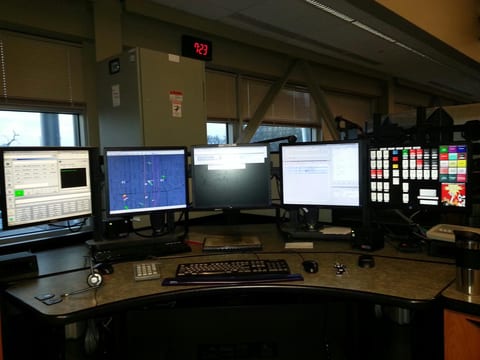
A 911 dispatch console is a piece of furniture with a job to do: hold every screen, keyboard and headset a telecommunicator needs within reach, at a height that works for a whole shift. Console manufacturers write at length about sit-stand height adjustment, monitor arm reach and how a cable tray keeps that furniture tidy. What most of that literature skips is the electronics riding inside the tray: how many computers a position actually has, where those computers physically live, and how a source at one console reaches a shared video wall down the room. This guide covers that AV and KVM layer, so a dispatch center orders the right console hardware and the right signal path together, instead of discovering a mismatch after the furniture arrives.
None of this replaces the console manufacturer's own guidance on ergonomics or cable management, and none of it names a specific furniture line, a radio brand or an operations standard. It is written for the signal chain that sits behind the desk: computers, monitors, USB peripherals, and the switcher and cable that connect them.
What a 911 dispatch console has to carry
Every dispatch position runs a set of applications side by side, and each one commonly gets its own monitor rather than sharing a single screen: computer-aided dispatch (CAD) for call and unit tracking, a radio control application, telephone or 911 call-handling software, mapping or automatic vehicle location, and sometimes a video feed from cameras or the shared wall. The exact count and mix is an agency decision, set by the applications the center actually runs, not a fixed number every console needs.
That monitor count is usually backed by more than one computer. A CAD workstation, a separate radio or phone system computer, and a mapping or video PC are common, each with its own operating system, licensing and update schedule, so consolidating them onto one machine is often not practical even where it might be technically possible. A single position can end up with two, three or more CPUs feeding its bank of monitors.
Beyond the computers and monitors, a position needs keyboards and mice, usually more than one set if the applications do not share input smoothly, a headset for radio and phone traffic, and enough power and data connections at the desk to run all of it without a tangle of cables across the work surface. A console's cable management, its raceways, grommets and trays, exists to carry this collection of video, USB, network, power and audio connections cleanly from the desk to wherever the computers actually sit, which is the question the rest of this guide works through.
CPUs in the console or in the equipment room
The most consequential decision for a dispatch console's AV design is also the simplest to state: do the computers sit inside the console furniture at the position, or in a separate equipment room down the hall? Each option carries real benefits and real trade-offs, and the right answer often varies by center, and even by position within the same room.
| Option | Benefits | Trade-offs |
|---|---|---|
| CPUs in the console | Short cable runs; simple, direct video and USB connections with no extension gear | Heat and fan noise on the dispatch floor; the console needs ventilated enclosures for the computers |
| CPUs in an equipment room | A cooler, quieter dispatch floor; easier maintenance and physical security for the computers | Video and USB must be extended from the equipment room to each console position |
An in-console CPU is the simplest arrangement on paper: the computer sits in a cabinet built into the desk, the video cable to the monitor is only a few feet long, and a keyboard or mouse plugs straight into the machine beside it. The cost of that simplicity is heat and fan noise generated right at the workstation, on a floor where telecommunicators sit for a full shift, so a console built this way needs enclosures with real ventilation, not a sealed cabinet that traps heat.
Moving the CPUs to an equipment room removes that heat and noise from the dispatch floor entirely and gives IT staff a single room to service, patch and replace computers without walking onto the operations floor or disturbing an active position. It also keeps the computers themselves under closer physical security than a console cabinet a visitor could reach. The cost shifts to the signal path: video and USB now have to travel from the equipment room to every console position, which is where an extension system comes in.
Extending video and USB to the console
When the CPUs move to an equipment room, the Key Digital KD-UPS52U extends 4K video up to 100 m over a single CAT cable to a console position, with the KD-X100MRx receiver included and installed at the console end. That receiver is powered over the same cable by the switcher, so there is no separate power supply to run at the console.
The same CAT cable also carries USB 2.0 alongside the video, so a keyboard, mouse or touchscreen at the console can reach back to a computer in the equipment room without a second cable run. USB routing on the system is set with one of four USB modes, one of which puts the USB host at the switcher in the equipment room with the USB devices at the receiver, the arrangement a dispatch console typically wants. USB routing does not follow whichever video source happens to be selected: it is a separate setting, chosen deliberately for how the position is meant to work, and Key Digital's manual notes that a mode change needs about a minute to take effect before USB traffic resumes. The system supports up to 15 USB devices in total.
It is worth being explicit about what this system is and is not. The KD-UPS52U is a presentation switcher: at a given position, it switches the video and USB path among a handful of connected sources, such as the CAD PC and the mapping PC shown in the diagram below. It is not a multi-computer, multi-monitor KVM built to put every CPU on every screen of a large console at once; a position with several monitors that each need their own dedicated computer feed still needs a video and USB path per monitor, not one switcher covering the whole desk.
Console signal parts
| Part | Role in the system | Note |
|---|---|---|
| KD-UPS52U | Switcher in the equipment room, 4K to 100 m, USB routing | Includes KD-X100MRx receiver |
| KD-X100MRx | Receiver at the console | Included with KD-UPS52U; powered over the cable |
| KD-PS42 | Switcher for shorter runs without USB, 4K to 40 m | Includes KD-X40MRx receiver |
| KD-X444LP | Point-to-point extender for a single source | 4K to 70 m on CAT5e/6, 100 m on CAT6A STP |
| KD-VW4x4ProK | Processor for a small wall fed from consoles | 2x2, 4x1, 3x1, two 2x1 or 1x4 modes |
Sharing a console source to the video wall
A dispatch floor often has a shared video wall at the front of the room, and a telecommunicator sometimes needs to put a console source, a map, a camera feed or a CAD screen, up on that wall for the room to see. The HDMI and HDBaseT outputs on the KD-UPS52U and the KD-PS42 are mirrored, so whichever source is selected at the console appears on both outputs at once: one feeding the console's own monitor, the other reaching toward the wall or its processor over cable.
That mirrored pair is what makes sharing a console source straightforward without a second switcher at the position: the same selection a telecommunicator makes for their own screen is already available on the second output, ready to route to the wall. For the sizing, layout and processor choices on the wall side itself, see control room video walls.
Working with the console manufacturer
A console's cable raceways, grommets and equipment cabinets are sized and placed by the furniture manufacturer, and they need to know what is actually running through them before the console is built, not after. Share the full equipment list for each position early: how many computers, how many monitors, and which extenders or switchers each position will use, since a KD-X100MRx receiver and a mounting plate for it take up real space in a cable tray or a rear cabinet.
Give the manufacturer the physical size of every extender and switcher planned for the console, along with the heat load of any CPU that will sit inside the furniture itself, so ventilation is planned in rather than added afterward. Agree early on exactly where receivers and switchers will mount: the KD-PS42 and KD-UPS52U are half-rack width with mounting ears, which fits inside a rack shelf or a console cabinet built to expect that size, but only if the console drawings account for it from the start. Leave service access as part of that conversation too, so a receiver or switcher can be reached later without pulling the console apart.
Dispatch console AV checklist
- List the applications and the monitor count needed at each position, set by the agency, not by a generic template.
- Decide CPU location per position: in the console furniture or in a shared equipment room.
- Measure the actual cable distance from the equipment room to each console position, not the straight-line floor-plan distance.
- Count the USB devices needed at each position, keyboard, mouse, touchscreen or other peripheral, against the system's 15-device limit.
- Decide which console sources need to reach the shared video wall, and confirm the switcher's mirrored output covers that need.
- Plan the cable raceway with the console manufacturer, terminate every run to 568-B on both ends, and avoid couplers and excess cable length.
- Plan power and battery backup for the console and equipment-room hardware; use the UPS runtime calculator to size backup runtime.
- Label every cable and keep spare receivers, switchers and cable on hand for fast replacement.
Frequently asked questions
What is a 911 dispatch console?
A 911 dispatch console is the workstation a telecommunicator uses in a public safety answering point: a desk that holds several monitors, computers, radio and phone equipment, and the cabling that connects them.
How many monitors does a dispatch console need?
It depends on the applications at each position, such as computer-aided dispatch, radio, phone, mapping and video. Plan the monitor count per position with the agency before choosing furniture and electronics.
Should dispatch console CPUs go in the console or an equipment room?
An equipment room removes heat and fan noise from the dispatch floor and simplifies maintenance, but video and USB must then be extended to each console. In-console CPUs keep cabling short but need ventilated enclosures.
How do you show a dispatch console screen on the video wall?
Send the console source through a switcher with mirrored outputs, such as the Key Digital KD-UPS52U, so one output feeds the console display and the other reaches the wall or its processor over cable.
Can USB keyboards and touchscreens reach a console from the equipment room?
Yes. The Key Digital KD-UPS52U system carries USB 2.0 over the same CAT cable as the video. USB routing is set with one of four USB modes and does not follow the selected video source.
Related guides
Questions about dispatch console AV?
Send it to a Key Digital engineer. We reply within one business day.
Message sent
Thanks. A Key Digital engineer will reply to your email within one business day.