
Quick answer: Connect the PC to a switcher with mirrored outputs, such as the Key Digital KD-PS42 or KD-UPS52U, which shows the selected source on an HDMI output and an HDBaseT output at the same time. Set an EDID that both displays accept, keep HDCP 2.2 in the chain for streamed content, and reach a distant TV over one CAT cable.
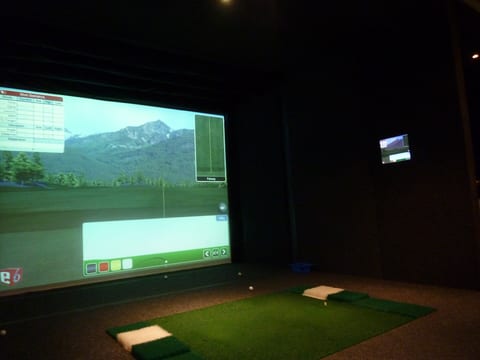
Most golf simulator bays already send video one place: from the sim PC to the impact screen. Adding a second screen for a lounge, a bar area or a couch behind the bay sounds like a matter of splitting that signal, and a lot of installs start with exactly that, a cheap HDMI splitter picked up for a few dollars. It often works for a week and then one screen goes black, or both do, the moment a streaming app or a different resolution gets involved. The fix is not a better splitter. It is a switcher built to keep two displays talking to one source without either one dropping out, and to run the far display over a single cable instead of a second long HDMI run.
Mirror or extend: two ways to use a second screen
There are two different things people mean by adding a second screen, and they need different hardware. The first is duplicating the picture: the exact same image, the same round, appears on the impact screen and on the TV at the same time. This is what most bays actually want, since the point is to let people away from the tee watch the same shot the golfer just hit. Duplicating the picture this way needs only one video output from the sim PC, routed to a switcher that can send it to two displays at once.
The second is extending the desktop: a different picture on each screen, for example the course view on the impact screen and a scorecard or a stats overlay on the TV. Extending needs a second video output from the PC itself, plus its own cable run to the second display, because the two screens are no longer showing the same signal. That is a heavier lift for the PC and the cabling, and most home and commercial bays do not need it.
Mirroring through a switcher is the simpler path for a bay that just wants the round to show up on a second screen, because it keeps the sim PC down to one video output and lets the switcher handle sending that same signal two places at once.
Why cheap splitters go black
A passive HDMI splitter has no logic in it. It copies the electrical signal to two ports and hopes both displays agree on what to do with it. Two things usually break that agreement.
The first is HDCP. Protected content, the kind that comes from a streaming app or a cable box, needs HDCP support on every display path from the source to the screen. If either display, or the splitter itself, does not handle the HDCP handshake correctly, the picture on that path goes black while the other one may keep working, or both fail at once.
The second is EDID. A video source can only send one format at a time, one resolution and one set of audio and color settings, based on the EDID data a connected display reports back to it. A 4K TV and a 1080p projector on the same source will often report different EDID information, and the source has to pick one format to send. Whichever display cannot accept that format simply shows nothing, and a passive splitter has no way to sort this out.
The KD-PS42 and KD-UPS52U are built around this exact problem. Both carry an internal library of 15 EDID handshakes, plus the option to copy a connected display's own EDID directly, so the source can be set to a format that both the near and far display accept instead of guessing at it. Their Full Buffer System manages HDCP authentication and the EDID handshake automatically, and both switchers are HDCP 2.2 licensed, so streamed content keeps playing on every display in the chain that also supports HDCP 2.2.
Mirrored outputs from one switcher
The KD-PS42 and KD-UPS52U each have an HDMI output and an HDBaseT output that are mirrored: whatever source is selected is shown on both outputs at the same time. There is no separate splitter stage and no extra switch to flip, because the mirroring is built into how the switcher's outputs work. One video connection from the sim PC, or from any other source plugged into the switcher, reaches both the near display and the far display as soon as it is selected.
Running the TV across the room over CAT cable
The near display, usually the projector on the impact screen, sits close to the equipment closet and can run straight off the switcher's HDMI output. The far display, a TV in a lounge or at a bar, is exactly the case the HDBaseT output is built for: it drives the included receiver at the far end over a single CAT cable, and the receiver is powered over that same cable, so there is no separate power supply to run out to the TV. The KD-PS42 reaches this TV at 4K up to 40 m, and the KD-UPS52U reaches it at 4K up to 100 m, both with their matched receiver included.
If both displays end up far from the equipment closet, the HDMI output can also be extended instead of run directly. A KD-X444SP on the HDMI output reaches 4K up to 50 m, and a KD-X444LP reaches 4K up to 70 m on CAT5e/6 or up to 100 m on CAT6A STP. Either extender turns the HDMI output into its own long run, separate from the HDBaseT output already carrying the signal to the other display.
Sports on the TV between rounds
A lounge TV next to a simulator bay rarely shows only the round. Connect a streaming box or a cable box to another input on the same switcher, and it becomes part of the same mirrored system. Auto-switching selects a newly connected source on its own, so plugging in or waking a streaming box can bring it to both outputs automatically, or the source can be selected directly by a front-panel button, over IP, with the KD-App, or with Compass Control Pro.
It is worth stating plainly what mirrored outputs mean here: because the HDMI and HDBaseT outputs always show the same selected source, switching to the game changes both screens at once. There is no way to keep the projector on the simulator while the TV shows something else through a single mirrored switcher. A bay that wants the TV to run independently, showing a game while the simulator stays live on the impact screen, needs to give that TV its own source and its own cable run instead of sharing the mirrored outputs.
Picture-in-picture as a software alternative
Some simulator setups skip a second display altogether and show a second window inside the impact screen picture itself, using the simulator software's own picture-in-picture or overlay feature to display a scorecard, a stats panel or a video feed alongside the course. This costs nothing in extra hardware and needs no second cable run at all. The tradeoff is that everyone in the room is still looking at one screen, so it works for a small overlay but does not give the lounge or the bar its own separate view the way a second TV does.
Parts for a mirrored second screen
| Part | Role in the system | Note |
|---|---|---|
| KD-PS42 | Switcher with mirrored HDMI and HDBaseT outputs | Includes KD-X40MRx receiver; 4K to 40 m |
| KD-UPS52U | Switcher with mirrored outputs for longer runs | Includes KD-X100MRx receiver; 4K to 100 m |
| KD-X444SP | Extends the HDMI output to a second far display | 4K to 50 m |
| KD-X444LP | Long range extender for the HDMI output | 4K to 70 m on CAT5e/6, 100 m on CAT6A STP |
Frequently asked questions
Can you connect a TV to a golf simulator?
Yes. Mirror the simulator picture to the TV with a switcher that has mirrored outputs, or extend the PC desktop to a second output. Mirroring keeps one PC output and shows the same round on both screens.
Why does my second screen go black with an HDMI splitter?
Usually an HDCP or EDID problem. Protected content needs HDCP support on every display path, and the source can only send one format, so a 4K TV and a 1080p projector can disagree. A switcher that manages EDID and HDCP avoids most of these failures.
How do I mirror the golf simulator to a TV far from the bay?
Use the HDBaseT output of a Key Digital KD-PS42 or KD-UPS52U. The included receiver at the TV is powered over one CAT cable and reaches 40 meters at 4K on the KD-PS42 or 100 meters on the KD-UPS52U.
Can the TV show a game while the simulator runs?
Not through one mirrored switcher. Its HDMI and HDBaseT outputs always show the same selected source, so switching to the game changes both screens. For separate pictures, give the TV its own source and cable run.
Is picture-in-picture a good alternative to a second TV?
It can be for a single screen. Some simulator setups show a second window on the impact screen with software. It needs no extra hardware, but everyone watches the same screen.
Related guides
Questions about a second screen for a golf simulator?
Send it to a Key Digital engineer. We reply within one business day.
Message sent
Thanks. A Key Digital engineer will reply to your email within one business day.